Release Notes: November 16th, 2026
Last updated: November 13, 2026
Overview
Workflows are the headline this time: a Launch button starts a real run from a workflow's own page, every run shows whether it was launched or tested, and the account lifecycle nodes now handle mobile plans the same way as the account operations they replace. Account verification extends to every contact on an account, custom objects and inventory models gain a protected secret field type, and tag keys and values can be renamed after they are created. This is a preview of what is coming so you can prepare.
Accounts
Verify any contact on an account: Expected: Releasing November 16th
Account verification is no longer limited to the primary contact. Any contact on the account can now be verified, so a call from a spouse, a business colleague or a secondary contact can be handled without falling back to manual checks.
Cancel or extend a PIN verification from the API: Expected: Releasing November 16th
Cancelling and extending a PIN verification are now available in the public v1 API, alongside the existing verification calls, so an integration can manage the whole verification flow rather than only starting it. Additionally, the PIN expiry setting can now be edited in the new section: Settings>Account Verification.
See SMS opt-out status on an account: Expected: Coming soon
When a customer opts out of SMS, the account will show it directly, so users know before trying to reach them that way.
Analytics
Created by on the Discounts Carry Forward report: Expected: Releasing November 16th
The Discounts Carry Forward report now has a Created By field showing the user who created each discount, so you can see who set up a discount without opening it.
Billing
Clearer subscription modification button: Released
The submit button on the subscription modification form now reads Submit modification instead of New modification.
Faster usage records in the API: Released
The API v1 usage records list now loads faster, especially for smaller organizations.
Payment confirmation emails for bank account payments: Expected: Releasing November 16th
Successful bank account payments will send the same Payment successful email as card payments. Currently, no email is sent when a bank account payment succeeds.
Clearer Authorize.Net ACH return messages: Expected: Releasing November 16th
When Authorize.Net returns an ACH payment, gaiia will show what the return code means, not only the code. For example, R01 will read as insufficient funds. This will cover the most common codes, including account closed, invalid account number, payment stopped and unauthorized debit.
Tax classifications for product catalog users: Expected: Releasing November 16th
Users who can view the product catalog will see tax classifications when they update a product or view its details, without needing billing tax permissions. Currently, the tax classification picker is empty for them.
Checkout
Track more events with Google Tag Manager: Expected: Releasing November 16th
If you use Google Tag Manager, you can now track 46 more events: 7 in checkout and 39 in the client portal, including logins, payments, plan changes and cancellations.
Checkout scrolls more reliably to the next step: Expected: Releasing November 16th
When customers complete a section, checkout now scrolls to the next item that needs their attention, such as add-ons after choosing a plan.
Choose whether $0 products show as Included or pre-selected: Expected: Releasing November 16th
You can now choose whether each $0 product shows an Included badge and whether it is pre-selected in checkout.
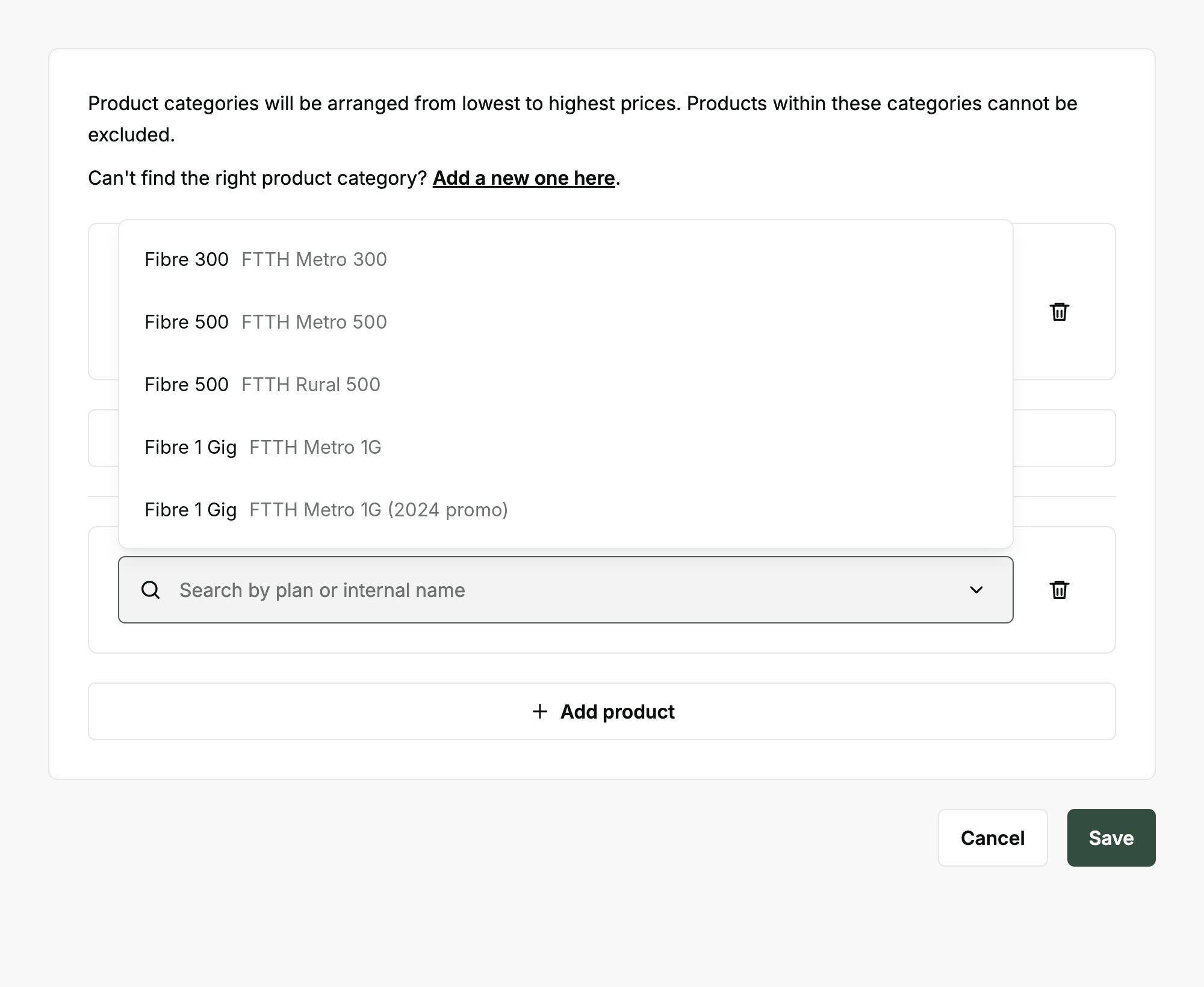
See internal names in checkout product pickers: Expected: Releasing November 16th
Product pickers in checkout settings now show each product's internal name in grey next to its translated name. You can search by either name, which makes it easier to tell apart plans that share the same customer-facing name.
Communications
Pass your own merge tag values through the API: Expected: Releasing November 16th
A communication sent through the v1 API can now include custom merge tag variables, so a workflow can supply values that are not stored on the account or the ticket and have them render in the template.
Print and mail for regulatory notices: Expected: Coming soon
A physical mail channel is in development, so notices that must be sent on paper can be sent from gaiia alongside your email communications.
Conversations
Know when a customer replies: Expected: Releasing November 16th
You will receive an in-app notification when a customer replies to a conversation you are part of, so a reply doesn't wait for someone to notice it.
Choose which notifications reach you: Expected: Releasing November 16th
Each user controls which conversation notifications they receive, rather than everyone receiving all of them.
Read and unread state per person: Expected: Releasing November 16th
Notifications have their own read state for each user, and reading a conversation marks its notification as read at the same time. Clearing your list does not change what a colleague sees.
Know when you are mentioned: Expected: Coming soon
You will receive an in-app notification when you are @mentioned in a conversation or a ticket note.
Custom Objects
Protected secret fields for custom objects: Expected: Releasing November 16th
Custom objects now have a Secret field type for passwords and other sensitive values. A new permission controls who can view and edit existing secret values. Users without it can still add a secret value when they create a record, if they can edit the object. They can't view or edit that value afterwards. Workflows can still read secret values.
Wider custom object reference chips on large screens: Expected: Releasing November 16th
On wide screens, reference chips (such as product references) now use the available space instead of cutting off names.
CSV import shows which columns failed and why: Expected: Releasing November 16th
When a custom object CSV import fails, the error now names the column and states whether the value is missing or in the wrong format. It also shows the format the field expects and highlights the incorrect cells in the preview. Previously, the message only listed row numbers. For example, the error now makes it clear when dates must use YYYY-MM-DD, or when "$100.00" can't go in a number column.
Inventory
Protected secret fields for inventory devices: Expected: Releasing November 16th
Inventory models now have a Secret field type for passwords and other sensitive values. A new permission controls who can view and edit existing secret values. Users without it can still add a secret value when they create a record, if they can edit the object. They can't view or edit that value afterwards. Workflows can still read secret values.
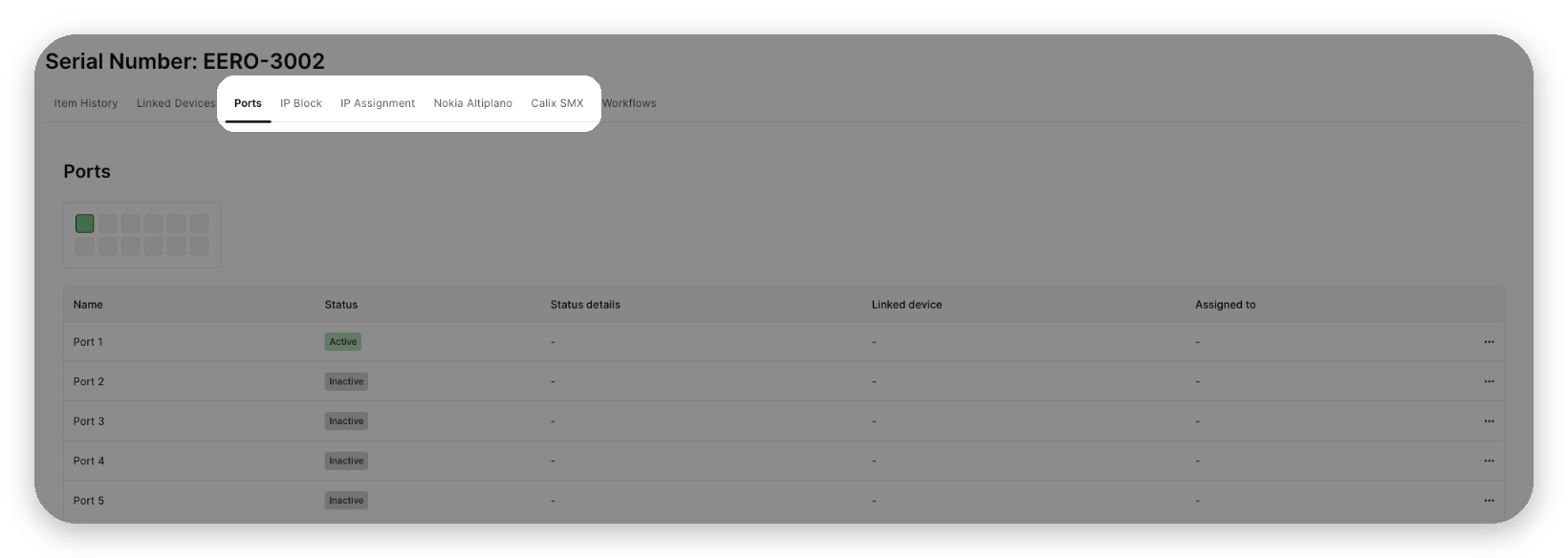
Ports, IPs and integrations on the inventory item page: Expected: Releasing November 16th
An inventory item's details page now has Ports, IP and Integrations tabs. You no longer need to find the account a device is assigned to before you can see its port layout.
Network
Tarana TCS Integration - Run speed test and set baseline workflow nodes: Expected: Releasing November 16th
Workflows can now run a speed test or set a baseline on a Tarana device. Previously, these had to be run manually on each device. You can now automate retests after installations, repairs or plan changes.
FreeRADIUS Integration - Configurable attribute mappings: Expected: Releasing November 16th
Custom RADIUS attribute mappings are now a table in the integration settings. Previously, each missing attribute required a code change. You can now add attributes yourself.
FreeRADIUS Integration - Workflow nodes for RADIUS accounts: Expected: Releasing November 16th
Adding, updating and deleting a RADIUS account are now workflow nodes of their own. The existing integration workflows call these nodes, so extension points work as before, and workflow builders can now use the nodes directly.
NetSapiens Integration - Initial version: Expected: Releasing November 16th
The NetSapiens integration can now be installed. It includes an install and update form and a base HTTP node for calling the NetSapiens API. This is the first step toward a more complete integration; simpler provisioning for subscribers, phone numbers and devices will follow.
Products
Sort the product catalog: Expected: Releasing November 16th
You can now sort the product catalog list by column, including category, family and last updated date.
Map drawing tool for product coverage areas: Expected: Releasing November 16th
Product coverage areas now have the same globe map drawing tool as network and workforce coverage areas.
Projects
Create work orders from a project and sequence them: Expected: Coming soon
You will be able to create work orders from a project and order them as steps, so field work follows the same sequence as the rest of the project.
Platform
Exact matches show first in global search: Expected: Releasing November 16th
When your search exactly matches an identifier, that record now appears first under a new Exact match heading, above the other results. It is already selected, so pressing Enter opens it.
This works for Account IDs and account numbers, ticket numbers, work order numbers, inventory serial numbers, MAC addresses (with colons, hyphens, dots or no separators), IP addresses and project custom IDs. Capitalization and extra spaces are ignored.
Rename tag keys and values: Expected: Releasing November 16th
Tag keys and tag values can now be renamed after they are created, including a change of capitalization only, so a typo is no longer permanent. Renaming to a name that already exists is refused and changes nothing. Renaming is available only through the public v1 API, for users with the Edit tags permission. The gaiia web app does not have a rename option.
Tags on accounts, orders, products and work orders show the new name.
Reports that refer to a tag key by its old name need to be updated after the tag key is renamed.
Tickets
Know when a ticket is assigned to you: Expected: Coming soon
You will receive an in-app notification when a ticket is assigned to you, in the same notification list as conversations.
Apply a template or form to an existing ticket: Expected: Coming soon
Ticket templates and forms can currently only be chosen when a ticket is created. You will soon be able to apply them to an existing ticket, so a ticket that arrives by email can be given the right form afterwards.
Workflows
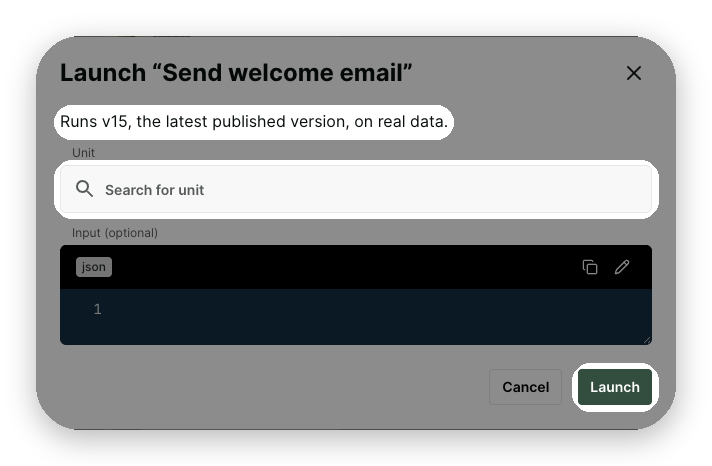
Launch a workflow from its own page: Expected: Releasing November 16th
Published workflows with a Manual or Schedule trigger now have a Launch button in the workflow header, so you can start a real run directly from the builder instead of going through the Workflow Launcher. The confirmation shows which version will run (always the latest published version, on live data). It also tells you that unsaved changes in your draft won't be included and, for scheduled workflows, that the regular schedule isn't affected. If a Manual workflow has an object type, you select the account, address or other record it runs on before you confirm.
The button is unavailable while the workflow is unpublished or disabled. Launching requires the new Workflows > Launch permission, which an administrator can add to any role in Settings.

Clearer distinction between test runs and real runs: Expected: Releasing November 16th
In the executions list, every run now shows Launched by or Tested by, so real launches and test runs are easy to tell apart.
Account lifecycle nodes updated: Expected: Releasing November 16th
The Activate Account, Suspend Account and Reactivate Account nodes now handle subscriptions the same way as the account operations they replace. Suspend and Reactivate leave mobile plans unchanged, since mobile service isn't suspended on cellular networks, and the reactivation email no longer lists them. Mobile add-ons, such as 911 fees, still follow the account through activation, suspension and reactivation in all three nodes.
When an account has no subscriptions left to suspend or reactivate, the node no longer fails. It still updates the account status and sends the customer email.
If you use these nodes in suspension, reactivation or delinquency workflows, review a few runs on accounts with mobile plans. Contact support if you would like help reviewing your setup.
Manual workflows start when optional fields are left blank: Expected: Releasing November 16th
A manual workflow whose trigger has an input schema can now be started with no input. Previously, it failed with a generic "The input must be of type object" message that didn't indicate which field was missing. Now a workflow whose fields are all optional starts normally, and one with a required field names that field in the error. This applies wherever a manual workflow is started: the Workflow Launcher, a test run, the API and the Start Workflow Execution node.
How we use these release notes
These notes represent a projection of upcoming changes over the next few weeks. Timelines may vary, and details may evolve. We may also update this article with additional information once features are fully released. Note that we only share changes that have a visible impact on the platform — many more improvements ship behind the scenes without appearing in the release notes, whether to stability, performance (such as loading times), or security.