Exclusion Dates
Last updated: November 5, 2026
Overview
The Exclusion Dates feature replaces the previous "Unsafe Dates" functionality with a more flexible way to restrict specific dates from being used in key processes.
These restrictions can prevent:
Customers from being marked delinquent on days when support isn’t available
Installations or service activations from being scheduled during restricted dates
Recurring invoices from reaching customers on days you choose, such as holidays
Types of exclusion dates
gaiia supports three types of exclusions:
Delinquency exclusion: Prevents customers from being marked delinquent on the specified date. If a customer's delinquency check falls on an exclusion date, it is deferred to the next valid day.
Checkout exclusion: Prevents specific dates from being selected as installation or activation dates during checkout, regardless of workforce availability.
Invoice exclusion: Holds recurring invoices due on the specified date. They are sent on the next day that isn't excluded.
How exclusion dates affect checkout
Once exclusion dates are set up, they are automatically enforced during checkout.
The Requested activation date field will disable any excluded dates
The Appointment selector will also hide them, even if technicians are available
How invoice exclusion dates affect invoices
When a recurring invoice is due on an invoice exclusion date, gaiia still creates it on its usual date, with its debits, discounts and taxes, but holds it instead of sending it. To set one up, follow Adding exclusion dates and choose Invoice exclusion as the type.

While an invoice is held:
It shows a Held tag with the date it will be sent.
No PDF is generated, no communication is sent, and autopay doesn't charge it.
It bills its usual billing period, with no proration. Changes to the subscription during the hold are prorated onto the next invoice.
If the service is cancelled during the hold, the invoice is sent right away, and the unused days are credited against it.
On the next day that isn't excluded, gaiia sends the invoice. Its invoice date, due date and autopay all count from that day, and its document is dated that day. If a fixed autopay day passed during the hold, autopay charges the invoice on the day it is sent. In the client portal, the invoice appears on the day it was sent.
Invoices created by the daily invoicing of uninvoiced debits, and by a reactivation on the invoice day, are held the same way. Manual, activation and cancellation invoices are always sent immediately. If scheduled invoice generation is turned off, no invoice is held.
A held invoice still triggers the billing_invoice.created event, with the status Held. If a workflow notifies customers when an invoice is created, make it continue only when the status is Open, or trigger it on billing_invoice.status_updated instead. Otherwise, customers are notified on the excluded day.
Supported date types
You can add:
Specific dates: e.g. Thanksgiving (Nov 27, 2025)
Recurring dates:
Weekly: e.g. Every Sunday
Yearly: e.g. New Year’s Day (Jan 1st)
Adding exclusion dates
You can create new exclusion dates from Settings.
Go to Settings
Select Exclusion dates
Click
New exclusion datesName your exclusion (e.g. "Christmas Day")
Choose the Type (Delinquency exclusion, Checkout exclusion or Invoice exclusion)
Select the Occurrence settings:
Specific date – if the exclusion occurs only once or moves each year
Recurring – if it repeats weekly or yearly
Set the date or recurring pattern
Click
Addto save

Managing existing exclusions
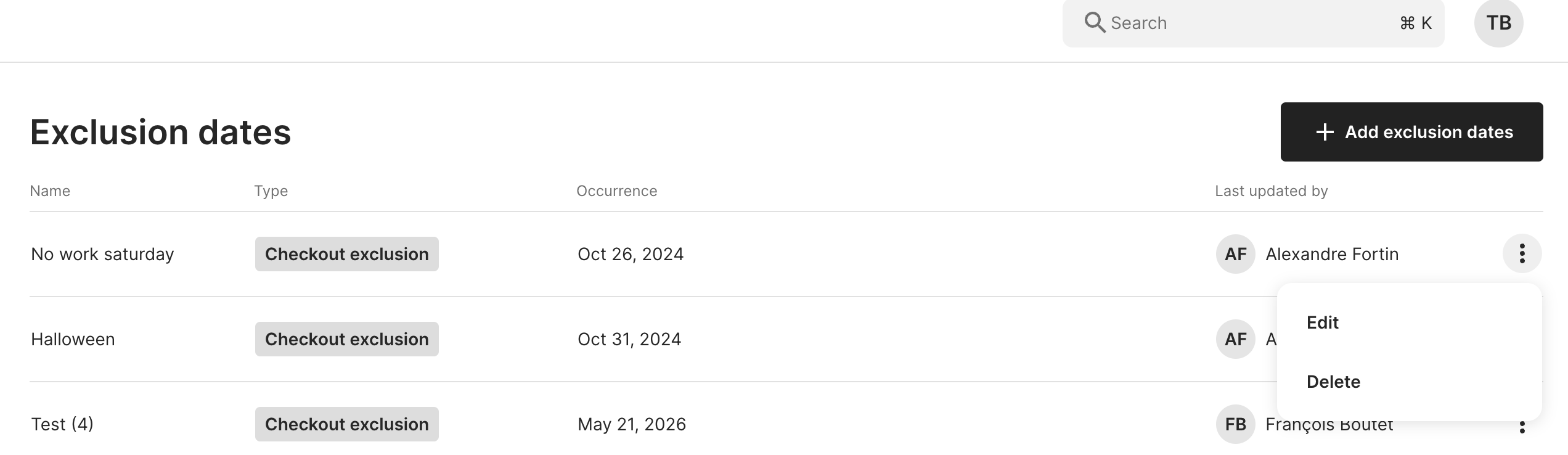
You can edit or delete any exclusion date using the ellipsis menu (⋮) beside each item.
A note on delinquency checks
Delinquency exclusion dates add an extra validation step when determining if a customer should become delinquent. To be marked delinquent, a customer must:
Have an outstanding balance equal to or greater than the threshold
Have one or more overdue invoices past the defined delay
Not fall on a delinquency exclusion date
If a customer fails any of these, they won’t become delinquent on that day. gaiia will retry the next day.