Release Notes: November 23rd, 2026
Last updated: November 23, 2026
Overview
The headline this time is the Field Service App: version 1.20 brings a new work order overview, two-way SMS between technicians and your customers, and a view of the inventory in each technician's truck. Workflows gain a Send Communication node and a command-line tool that lets AI assistants read, build and test workflows for you. Tickets without a form can now have a template applied after the fact, and global search pins exact identifier matches above everything else. This is a preview of what is coming so you can prepare.
Accounts
Set the PIN expiry yourself: Expected: Releasing November 23rd
The account verification PIN expiry, which gaiia previously changed on request, is now in your settings, so you can set it yourself without contacting support.
For more details, check out this article: Setting up account verification
Move a sub-account to a different parent: Expected: Releasing November 23rd
You can now reassign a sub-account to another parent account directly, without contacting support.
Search on custom fields: Expected: Coming soon
Custom field values on accounts, businesses and addresses will become searchable, including finding an account by circuit ID from global search.
See SMS opt-out status on an account: Expected: Coming soon
When a customer opts out of SMS, the account will show it directly, so users know before trying to reach them that way.
Checkout
Checkout scrolls more reliably to the next step: Released
When customers complete a section, checkout now scrolls to the next item that needs their attention, such as add-ons after choosing a plan.
Choose whether $0 products show as Included or pre-selected: Released
You can now choose, for each $0 product, whether it shows an Included badge and whether it is pre-selected in checkout.
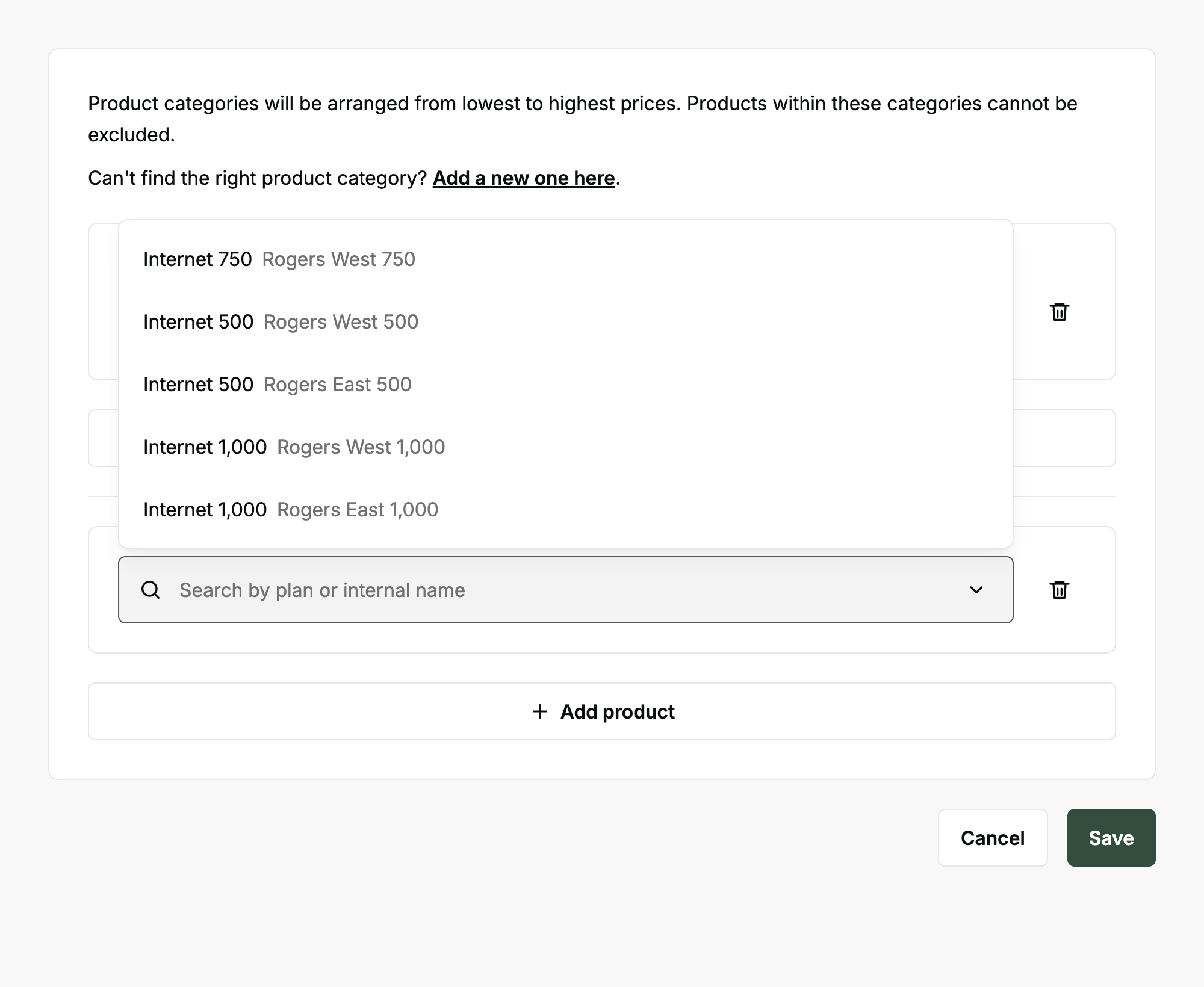
See internal names in checkout product pickers: Released
Product pickers in checkout settings now show each product's internal name in grey next to its translated name. You can search by either name, which makes it easier to tell apart plans that share the same customer-facing name.
Communications
Use a brand name merge tag: Expected: Coming soon
A merge tag for your brand name will be available in both email and SMS communications.
Print and mail for regulatory notices: Expected: Coming soon
A physical mail channel is in development. Notices that must be sent on paper will be sent from gaiia, alongside your email communications.
Conversations
Know when you are mentioned: Expected: Coming soon
You will receive an in-app notification when you are @mentioned in a conversation or a ticket note.
Projects
Create work orders from a project and sequence them: Expected: Releasing November 23rd
Work orders can now be created from a project and ordered as steps, so field work follows the same sequence as the rest of the project.
Tickets that wait for their step: Expected: Releasing November 23rd
Tickets on a phased project are now held until their step is reached and advance automatically, instead of all appearing at once.
Platform
Better ranking for exact matches in global search: Expected: Releasing November 23rd
Global search now ranks an exact identifier match above everything else. When your search exactly matches an identifier, that record is pinned under a new Exact match heading, above the usual results, instead of appearing among partial matches. It is already selected, so pressing Enter opens it.
Tickets
Apply a template to a ticket that already exists: Expected: Releasing November 23rd
Tickets that arrive by email or through the client portal have no template, so they could not have a form. An open ticket without a form now shows an Apply template action: choose a template and its form appears on the ticket, ready to fill in.
Applying a template fills the type, categories, team and due date only where the ticket's own field is empty, and never changes the title, description, customer email or comments. A ticket that already has a form keeps it. The same action is available in the v1 API, so a workflow can handle the triage.
Report on ticket photo details: Expected: Releasing November 23rd
The capture details stored on photos attached to tickets can now be used in reports and through the v1 API, so image metadata can be analyzed rather than only viewed on the ticket.
Know when a ticket is assigned to you: Expected: Coming soon
You will receive an in-app notification when a ticket is assigned to you, in the same notification hub as conversations.
Workflows
Connect your AI assistant to gaiia with the gaiia CLI: Expected: Releasing November 23rd
The gaiia command-line tool (CLI) lets AI assistants such as Claude Code or Cursor work in gaiia for you, starting with workflows: reading them, adding and changing steps, saving drafts, testing and publishing. Developers can also run it themselves from a terminal.
Download it from the new CLI card in the Help & Support area, sign in once, and everything runs as you, with your own permissions. The first time you sign in, the CLI asks whether it can change data or should stay read-only, so an assistant that is only exploring cannot change anything by accident.
The new Tools > Command-line tools permission controls who can use it. To install it and get your assistant started, follow Using the gaiia CLI.
Send an email or SMS with the new Send Communication node: Expected: Releasing November 23rd
A new Send Communication node, under gaiia nodes > Accounts, sends an email or SMS from a custom or system template in one step, with no GraphQL to write. It can attach up to 10 gaiia documents to the email and fill in your own merge tags. Sent messages appear on the account's Communications tab.
Sending Communications from a Workflow covers each input and how to handle a send that fails.
See which workflows use each secret and variable: Expected: Releasing November 23rd
The Secrets and Variables tabs in Workflow Settings now have a Workflows column that counts the published workflows using each one. Click the count to see which workflows they are and open any of them, so you know what a change will affect before you make it.
A secret or variable that a published workflow uses can no longer be deleted by mistake: remove it from those workflows first. Understanding Node Input Types has the details, along with how secrets and variables work in your nodes.
Clearer Test and Launch dialogs in sandbox environments: Expected: Releasing November 23rd
In a sandbox, the Test dialog no longer warns that you are working with live production data. It states that the run uses sandbox data instead. In production, the warning remains and now reads more plainly: test runs use and change live data, and their outcomes cannot be undone. The Launch dialog names the version it will run in its title and states whether it runs on sandbox data.
See how your workflows are doing at a glance: Expected: Coming soon
The Executions page will show how many of your runs completed, failed, were cancelled or are still running. The Library page will show how many of your workflows are actively used, and which might need attention. You will be able to spot problems without scrolling through every run.
Workforce
Field Service App 1.20 - New work order overview: Expected: Releasing November 23rd
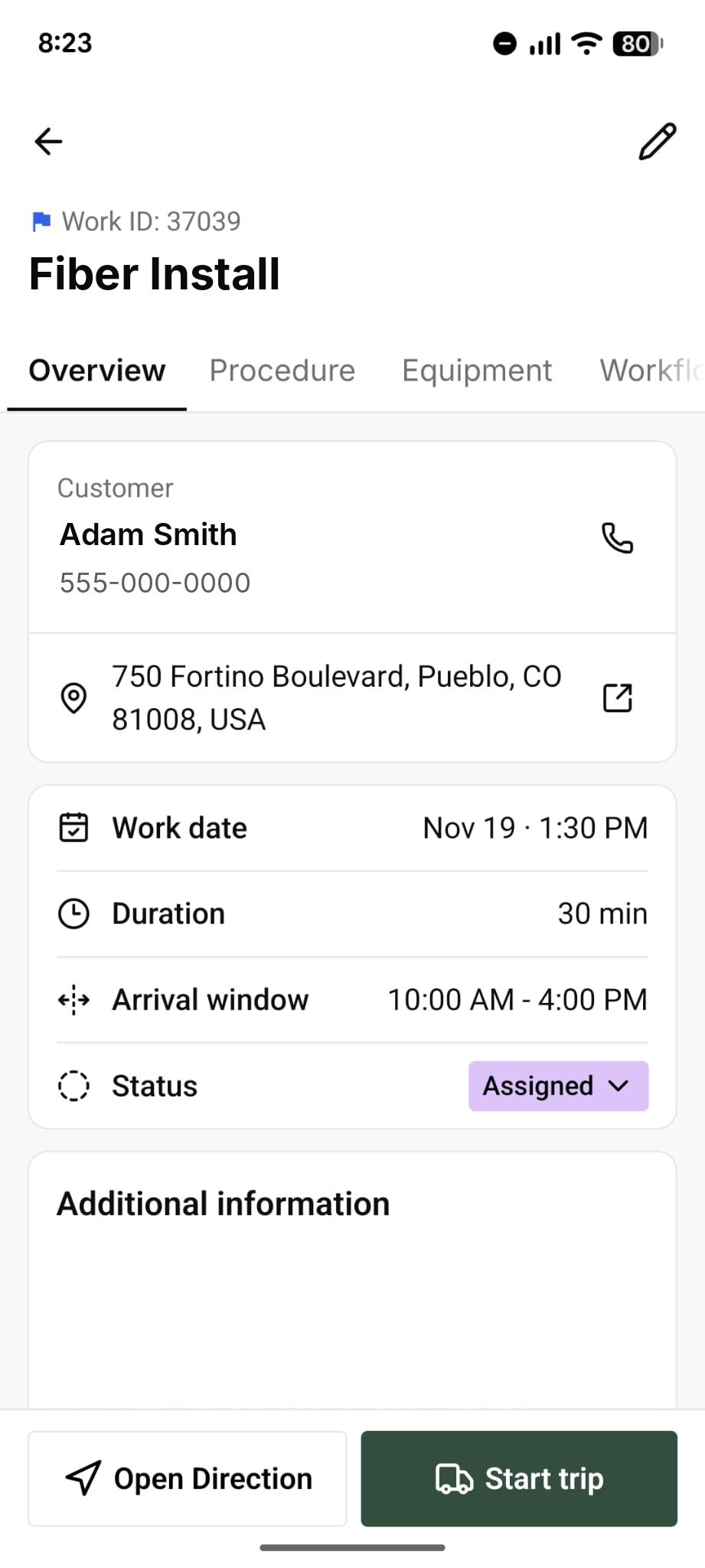
Our largest Field Service App update of the year, version 1.20, will reach your technicians' phones between November 24th and December 1st. It brings three upgrades: a new work order overview page, My Inventory, and two-way SMS.
The new overview page puts customer information first. Technicians can call the customer without scrolling to find their phone number, and go en route or get directions while previewing their next job. The page loads in advance, so it opens faster from the dashboard and is available offline.
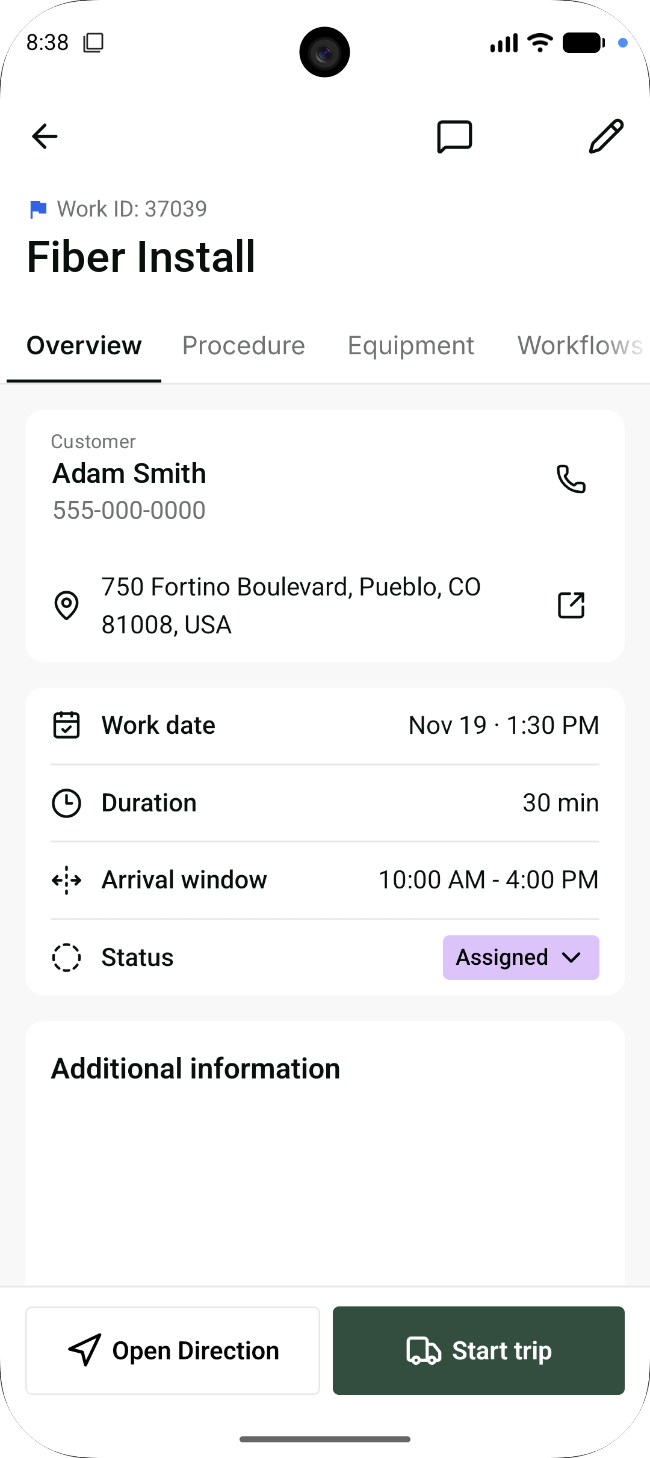
Two things moved: the Edit button that let technicians change the work type is now a pencil icon, in the same top-right location, and the assigned duration is now shown explicitly instead of having to be worked out from the times.
Field Service App 1.20 - Text customers from the app: Expected: Releasing November 23rd
Technicians can now send text messages to your customers through gaiia, for example to let an upcoming appointment know they are running late. Previously, a message sent from a technician's personal or work phone was not visible to you, and a later reply from the customer did not reach your back office.
Two-way SMS uses the Conversations module and its SMS integration. If you are not using Conversations, the chat button next to the pencil icon is not shown. To get set up, contact support@gaiia.com.
Field Service App 1.20 - See the inventory in your truck: Expected: Releasing November 23rd
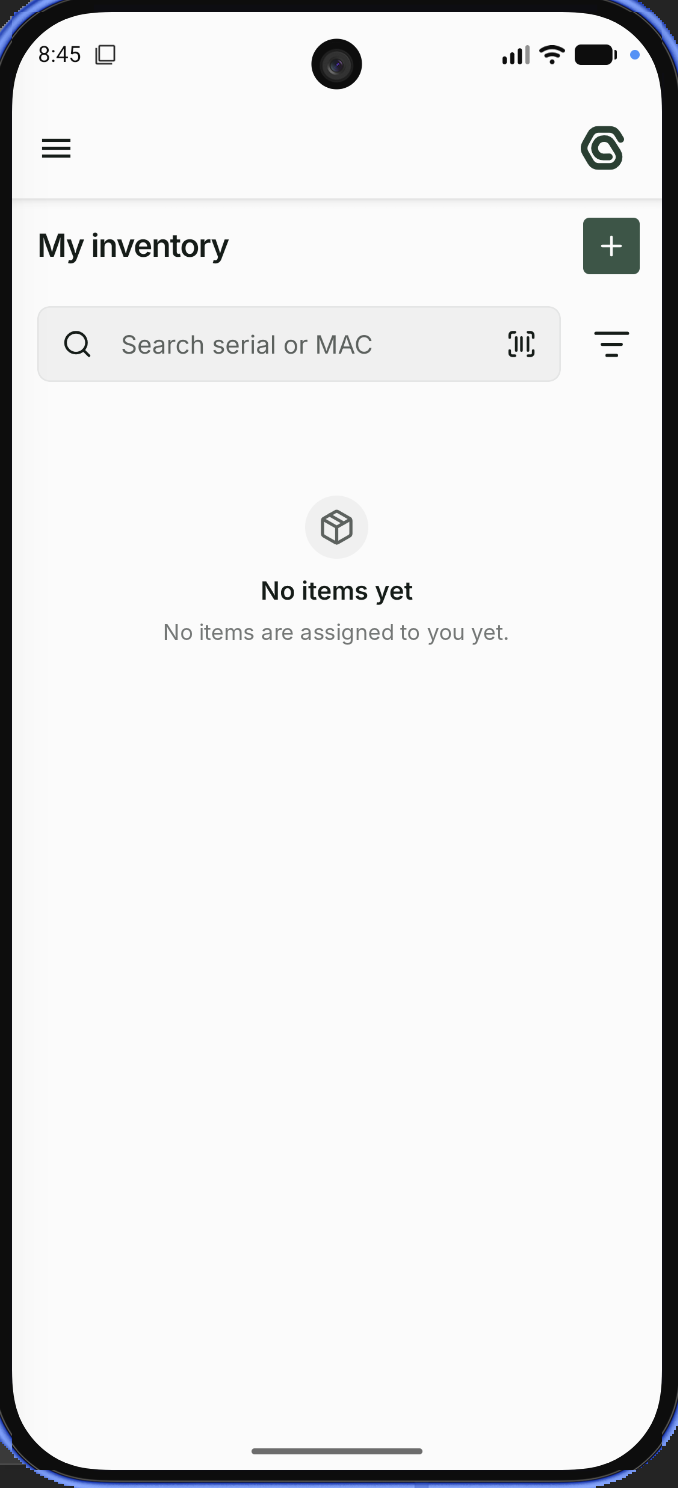
A new My inventory page lets technicians see what is in their truck from the app.
Filter the Schedule page by who is scheduled: Expected: Releasing November 23rd
On the Schedule page, you can now filter technician swimlanes to show technicians who are scheduled or not scheduled (off). By default, both options are unchecked, so technicians who are working and technicians who are off are both shown. You can save your preferred filters in your custom views.
Auto-assign schedules ahead of the current time: Expected: Releasing November 23rd
When a user auto-assigned an appointment in the current arrival window (for example at 2 PM, in a 1 PM to 4 PM window), a technician with no work at 1 PM could receive the job at 1 PM. Jobs are now always scheduled ahead of the current time.
Filter temporary overrides by date range: Expected: Coming soon
You will be able to filter the list of temporary overrides using a date range selector.
For more details, check out this article: Using temporary overrides
API
Read user groups in the public API: Expected: Releasing November 23rd
User groups can now be read through the public API, and the API docs show how to list the users in a group. Use
userGroupsto list groups,userGroupto read one, or a user'suserGroups, then read each group'smembers. You can filter groups by name, status or member, and page through the results. Creating and changing groups stays outside the public API for now.Any signed-in user can read a group's details. Listing its members requires the View user access permission.
How we use these release notes
These notes represent a projection of upcoming changes over the next few weeks. Timelines may vary, and details may evolve. We may also update this article with additional information once features are fully released. Note that we only share changes that have a visible impact on the platform — many more improvements ship behind the scenes without appearing in the release notes, whether to stability, performance (such as loading times), or security.