

Accessing your Real-Time Transactions List
Overview
The Transactions list allows you to view and inspect all the transactions that happened in your instance, for all of your customers.
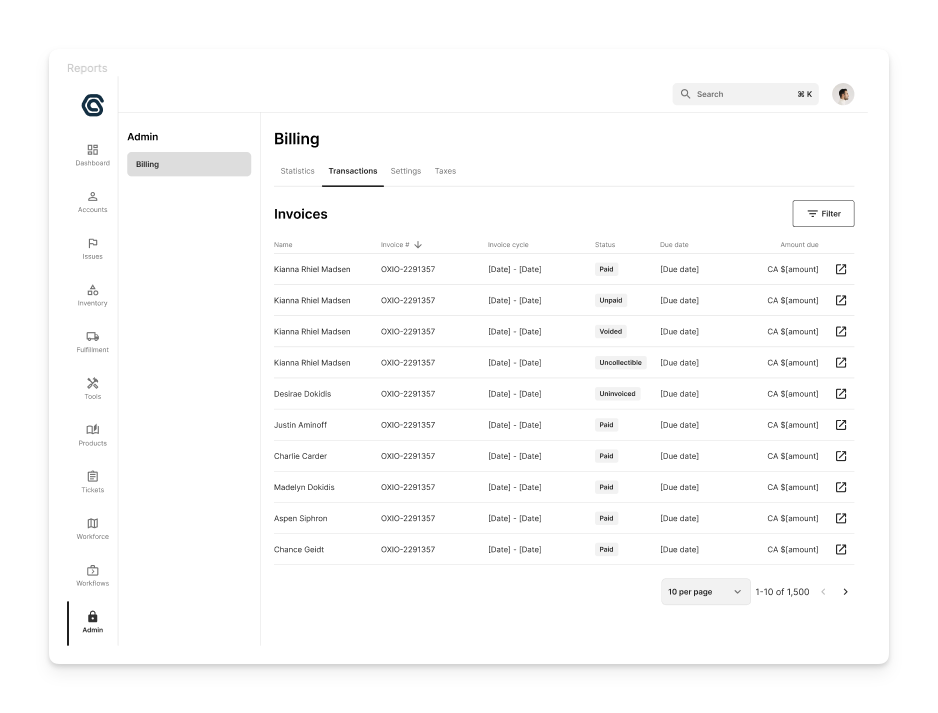
The Transactions list provides a real-time view of all activity that is occurring, meaning a payment taken a few minutes ago will show up as intended.
The Transactions list is great for:
Troubleshooting by reviewing transaction data in real-time
Responding quickly to your customer's inquiries
Answering questions such as: "What are all the failed payments I have for today?"
Reporting will continue to offer the immutable data used for reconciliation and financial reporting
All types of Transactions are available in this view:
Debits
Discounts
Refunds
Payments
Steps
To view the transaction list you will need the Billing > Transactions > View permission enabled.
Navigate to the Admin menu
Select the Billing sub-menu
Click on the Transactions tab
Click on a transaction's
Chevron button
to open a detailed view of the entry
You can also click on the chevron in the list's header to expand all transactions that are currently shown on the page
From there, you can use the
Filterbutton to narrow-down shown transactionsFilter
Information
Created at
Filter by the date at which the payment(s) occurred
Type
Filter by Debit, Discount, Payment or Refund
Unvoiced or Invoiced Debits
conditional - Debits ONLY
Discount Reason
conditional - Discounts ONLY
Payment Status
conditional - Payments ONLY
Refund Status
conditional - Refunds ONLY