Release Notes: November 9th, 2026
Last updated: November 6, 2026
Overview
The headline this time is the work order: it can be linked to a project, it shows up on the address it was done at, and auto-assign now counts the technician's drive back to base. Global search puts exact identifier matches first, custom object CSV imports explain which columns failed, and several billing changes are already live, including invoice exclusion dates for holidays. This is a preview of what is coming so you can prepare.
Accounts
Set the PIN expiry yourself: Expected: Coming soon
The account verification PIN expiry can currently only be changed by gaiia on request. It will move into your settings, so you can set it without contacting support. Cancelling and extending a PIN verification will also be added to the public API, alongside the existing verification calls.
Verify any contact on an account: Expected: Coming soon
Account verification will extend beyond the primary contact, so any contact on the account can be verified.
Analytics
User groups in your analytics data: Expected: Coming soon
User groups, with their name, description and active or archived status, will be added to your analytics data. This is a first step toward filtering dashboards by team, which is not available yet.
Billing
Hold invoices on invoice exclusion dates: Released
You can now set invoice exclusion dates, such as holidays. A recurring invoice due on an excluded day is held and sent on the next day that isn't excluded. Held invoices show a Held tag with their send date, and they stay correct if the subscription changes or is cancelled during the hold. In the client portal, invoices now appear on the day they were sent.
For more details, check out this article: Exclusion Dates

Preview a subscription change before saving it: Released
You can now see the amounts of a subscription cancellation or price change before you save it. The preview uses the same calculation as the change itself.
The legacy billing reports tab is retired: Released
The legacy billing reports tab and its reports are removed, except the mailed invoices report. Use Analytics for billing reporting.
Mass discounts catch empty required fields: Released
When you upload a mass discount file, validation now flags rows with an empty required field, such as the account or the discount reason. Before, these rows failed later.
Removing a payment integration cleans up its webhooks: Released
When you remove your Stripe or Authorize.Net integration, gaiia now also removes the webhooks it created in your processor account. This prevents failed-delivery emails from being sent.
Checkout
Block reasons for checkout orders: Released
When checkout blocks an order, admins can now see why by hovering over the Blocked label on orders. This is shown only in the admin view and never on the public checkout, for privacy.
Default language for each checkout and portal domain: Released
You can now set a default language for each checkout and client portal domain, so a customer's first visit opens in that language. If you run separate domains for different languages, your customers no longer have to switch the language themselves.
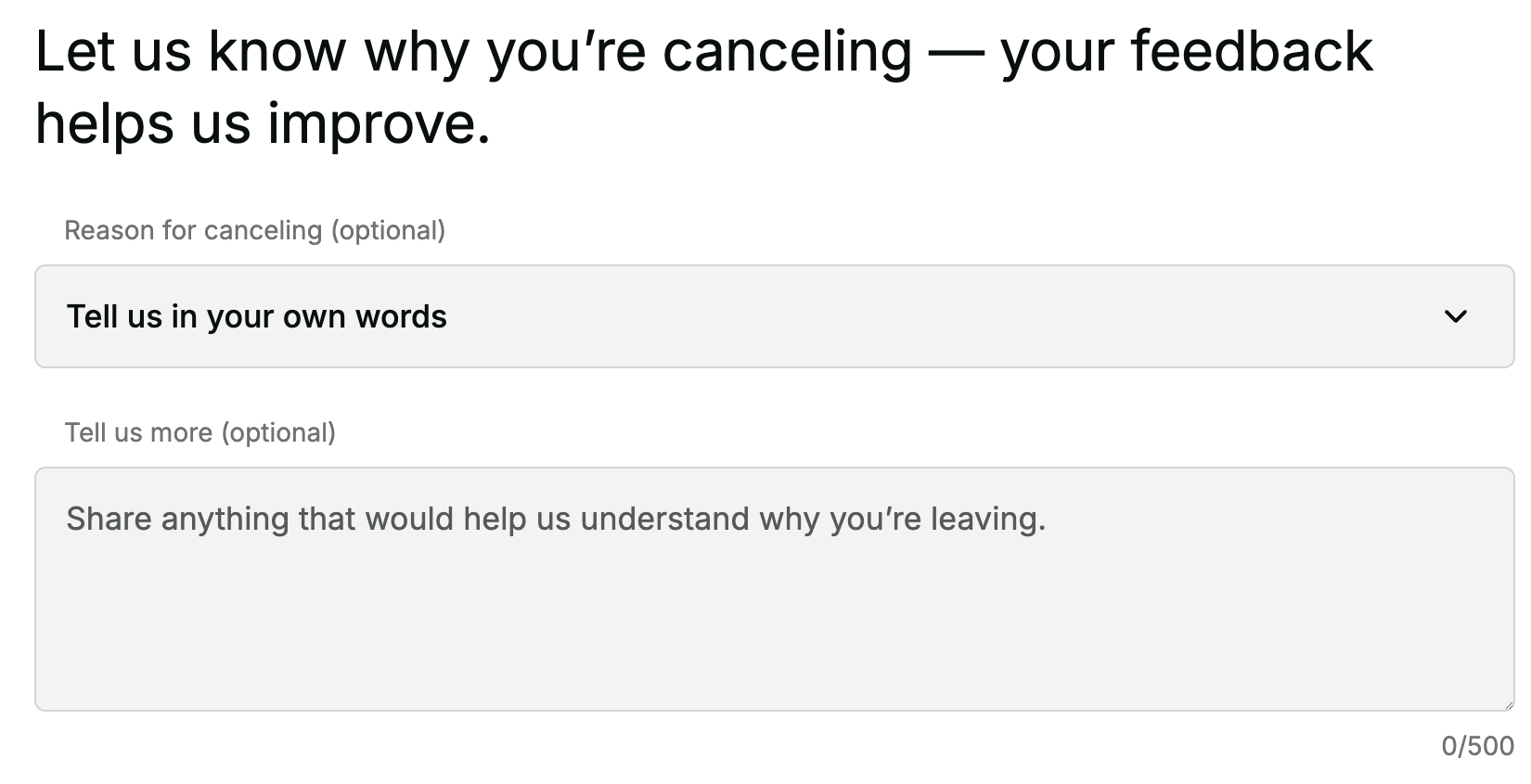
Cancellation notes in the client portal: Released
Customers who cancel their accounts in the client portal can now explain in their own words why they're leaving. These notes are saved to Snowflake. This only applies if you have turned on cancellations in the client portal.
Clearer URL errors in the CMS: Released
When a URL is incorrectly formatted, the error now shows next to the field on the edit step, with an example of a valid URL. Admins can't move on to the review step or publish until every error is fixed.
Email and phone validation in the CMS: Released
The contact email and phone fields now accept only valid email addresses and phone numbers. Anything else shows an inline error.
More Google Tag Manager events: Expected: Releasing November 9th
46 additional analytics events are now available through Google Tag Manager. Most of them come from the client portal, which didn't send any events before. Examples include logins, payments, plan changes and cancellations.
Default French copy in the CMS: Expected: Releasing November 9th
French fields in the CMS now show their default copy, the same way English fields do. Admins can see what French-speaking customers see before they make changes.
Last published time in the CMS: Expected: Releasing November 9th
A Last published caption now appears under the Review changes button, so admins can confirm that their changes are live. It shows the most recent publish by anyone on your team.
Better address search suggestions in checkout: Expected: Coming soon
Address suggestions will give the most weight to numbers in the search, like the civic number in “123 Main St”. Customers should see their exact address at the top of the list more often, so they can find it faster.
Communications
Communication types in the API: Expected: Releasing November 9th
Communication types are now available through the public API, so an integration can set the type on a communication the same way the app does.
A brand name merge tag: Expected: Coming soon
A merge tag for your brand name will be available in both email and SMS communications.
Realistic values in template previews: Expected: Coming soon
Template previews currently fall back to sample values. They will be replaced, so a preview reflects your own organization.
Conversations
A notification hub in the app: Expected: Coming soon
A bell icon in the top bar will open a list of what needs your attention, so you no longer have to check each conversation to find new activity.
Read and unread state per person: Expected: Coming soon
Each user will have their own read and unread state for notifications, matching how conversations already work, so marking something read doesn't change what a colleague sees.
Choose which notifications you get: Expected: Coming soon
Each user will be able to choose which conversation notifications reach them.
Know when a customer replies: Expected: Coming soon
You will get an in-app notification when a customer replies to a conversation you are part of.
Custom Objects
CSV import shows which columns failed and why: Expected: Releasing November 9th
When a custom object CSV import has problems, the import page now names the column behind each one, says whether a required value is missing or a value has the wrong format, and lists the affected rows. Wrong-format problems show the format that field expects, like YYYY-MM-DD for dates or a plain number with no currency symbol, and invalid cells are highlighted in red in the preview, so you can fix the file without guessing.
Primary fields always stay unique: Expected: Releasing November 9th
A custom object's primary field can no longer be set to allow duplicate values, since it identifies each record. When a record is saved with a primary value that's already taken, you now get a clear error that names the field, instead of an unexpected server error.
Projects
Configure the steps a project moves through: Expected: Coming soon
A project type will be able to define its own phases of tickets in the project type builder, so projects of that type follow a consistent path.
Tickets that wait for their step: Expected: Coming soon
Tickets on a phased project will be able to wait until their step is reached and then advance automatically, instead of all appearing at once.
A tickets tab built for phased projects: Expected: Coming soon
The Tickets tab on a project will be reworked around phases, so the work shows in the order it happens.
Platform
Exact matches show first in global search: Expected: Releasing November 9th
When your search exactly matches an identifier, that record now appears first under a new Exact match heading, above the usual results. It is already selected, so pressing Enter opens it.
This works for account gaiia IDs and account numbers, ticket numbers, work order numbers, inventory serials, MAC addresses (with colons, hyphens, dots or none), IP addresses and project custom IDs.
Tickets
Apply a template or form to an existing ticket: Expected: Coming soon
Ticket templates and forms can currently be chosen only when a ticket is created. You will soon be able to apply them to an existing ticket, so a ticket that arrives by email can be given the right form afterward.
Know when a ticket is assigned to you: Expected: Coming soon
You will get an in-app notification when a ticket is assigned to you, so you don't have to keep watching the list to stay up to date.
Workflows
Format code in the editor: Expected: Releasing November 9th
The workflow configuration editor now has a button that formats your code, so pasted or hand-edited code is easy to read again.
Labels across workflow views: Expected: Releasing November 9th
Workflow labels now show in the Workflow Executions and Custom Nodes tables, and in the workflow's header, so you can scan and sort workflows by label at a glance.
Launch a workflow from its page: Expected: Coming soon
You will be able to launch a manual workflow with no object type, or a scheduled workflow outside its schedule, straight from the workflow's page. It will run the latest published version as a regular execution rather than a test. A new Launch permission will control who can do this.
Workforce
Auto-assign counts the drive back to base: Expected: Releasing November 9th
Auto-assign now counts the technician's drive back to their base location when it assigns the last work order of the day. You can find the new setting in Settings > Appointments.
Work orders tab on address entities: Expected: Releasing November 9th
When you open an address entity, you can now click a Work orders tab, similar to Accounts, that lists all historic work orders. All work orders created after the release are tied to an address entity in gaiia, and a new address entity is created if needed.

Link work orders to projects: Expected: Releasing November 9th
Projects now have a Work orders tab where you can link or create work orders for the project, and the project shows on the work order. This starts on web only.
Temporary overrides improvements: Expected: Releasing November 9th
The activity log now shows who created, modified or deleted a temporary override. You can also run a workflow when a temporary override is created, updated or deleted, and create, update or delete a temporary override from a workflow based on other events in gaiia. This lets you set up recurring overrides ahead of the native recurring overrides feature.
Filter the schedule by who is on shift: Expected: Coming soon
On the Schedule page, you will be able to filter technician swim lanes by who is on or off shift, and add the filter to your custom views.
How we use these release notes
These notes represent a projection of upcoming changes over the next few weeks. Timelines may vary, and details may evolve. We may also update this article with additional information once features are fully released. Note that we only share changes that have a visible impact on the platform — many more improvements ship behind the scenes without appearing in the release notes, whether to stability, performance (such as loading times), or security.